Login Is Not Just a Button: How Modern Identity Systems Build Trust
We log in to products every day. Email and password login is login. Google login is login. GitHub login is login. In Web3 products, it becomes Connect Wallet or Sign in with Wallet.
From the user's perspective, login looks like a single button. From the system's perspective, login is a chain of trust.
It needs to answer four questions:
- Who are you?
- How does the system remember you?
- What are you allowed to do?
- How can other systems prove that you are trusted?
That is why modern applications often involve terms like authentication, authorization, sessions, JWTs, access tokens, refresh tokens, OAuth2, OpenID Connect, and SSO. They are all related to login, but they solve different problems.
Authentication: who are you?
Authentication means verifying identity. It answers one question: how does the system know who you are?
When you log in with an email and password, the system checks whether the password is correct. When you log in with Google, the system asks Google to prove that this account belongs to you. When you sign a message with a crypto wallet, the system verifies that you actually control that wallet address.
All of these are forms of authentication.
Authentication = checking your ID.
But being authenticated only means the system knows who you are. It does not mean you can do everything.
You may enter an office building, but that does not mean you can enter the finance room. You may log in to an admin dashboard, but that does not mean you can delete users. You may connect a wallet, but that does not mean you can view all referral, reward, or billing data.
That brings us to the next concept: authorization.
Authorization: what are you allowed to do?
Authorization means access control. It answers this question: how does the system decide what you can access or operate?
Authentication asks who you are. Authorization asks what you are allowed to do.
For example, after you log in to an internal dashboard, the system still needs to decide:
- Can you view orders?
- Can you change system settings?
- Can you export user data?
- Can you create another admin account?
These are not authentication problems. They are authorization problems.
Many security issues happen not because the system has no login, but because it only checks whether the user is logged in, without checking whether the user has permission to access a specific resource.
The key takeaway is:
Login success does not mean full access.
Authentication checks identity. Authorization checks permissions.
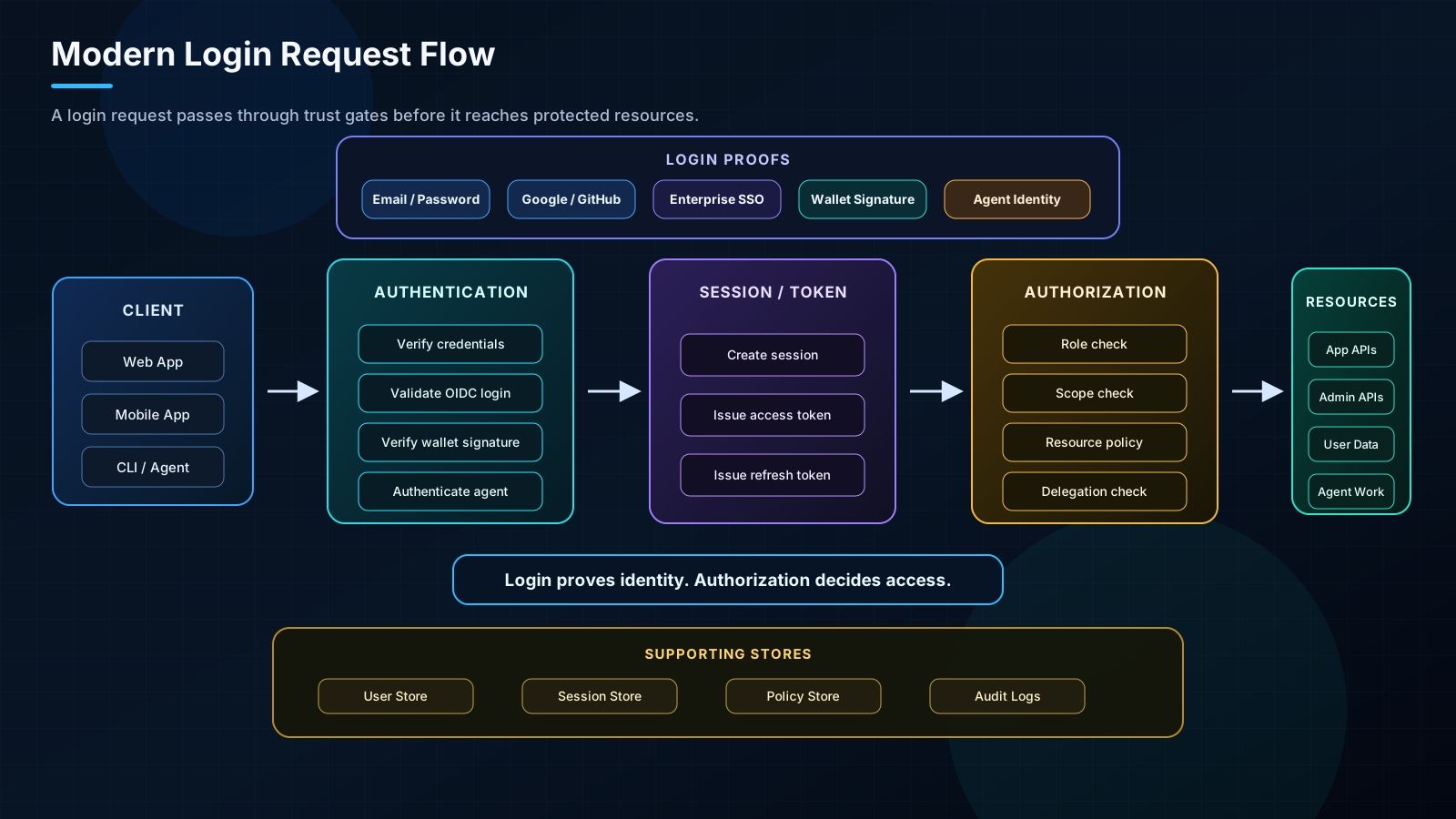
Figure 1. A modern login request moves through authentication, session or token issuance, authorization, and supporting stores before reaching protected resources.
Session and JWT: how does the system remember you?
After a user logs in successfully, the system needs to solve another problem: how does it know the next request is still from the same user?
Users should not have to enter their password every time they refresh a page, click a button, or call an API. So the system needs a way to maintain login state. Two common approaches are sessions and tokens. JWT is one of the most common token formats.
A session works like this: after the user logs in, the server creates a session record and sends a cookie to the browser. On future requests, the browser sends the cookie back. The server uses that cookie to look up the session and identify the user.
In short:
Session = the server remembers you.
The advantage of sessions is strong server-side control. The server can log users out, revoke a session, or invalidate old sessions after permission changes. That makes sessions a good fit for traditional websites, admin dashboards, and internal enterprise systems.
The trade-off is that sessions require server-side state. If the system runs on multiple servers, the session state needs to be shared, often through a store like Redis. Otherwise, one server may know the user while another does not.
JWT works differently. After login, the server issues a signed token. On future API requests, the client sends that token. The server verifies the token signature and reads the claims inside it.
In short:
JWT = the client carries a signed pass that the server can verify.
A JWT usually looks like this:
The important part is not encryption. It is the signature.
JWTs are usually not encrypted. Do not put passwords, private keys, ID numbers, or other sensitive data inside a JWT.
In many cases, the JWT payload can be decoded and read. The signature prevents tampering; it does not hide the content.
JWTs are useful for APIs, mobile apps, frontend-backend separated systems, and microservices. The server does not always need to look up session state. It can verify the signature and decide whether the token is trusted.
But JWTs are not magic. Once issued, they are usually harder to revoke before expiration. If a token lives too long and gets leaked, the risk can be significant.
So JWT is not automatically better than a session. They are designed for different scenarios.
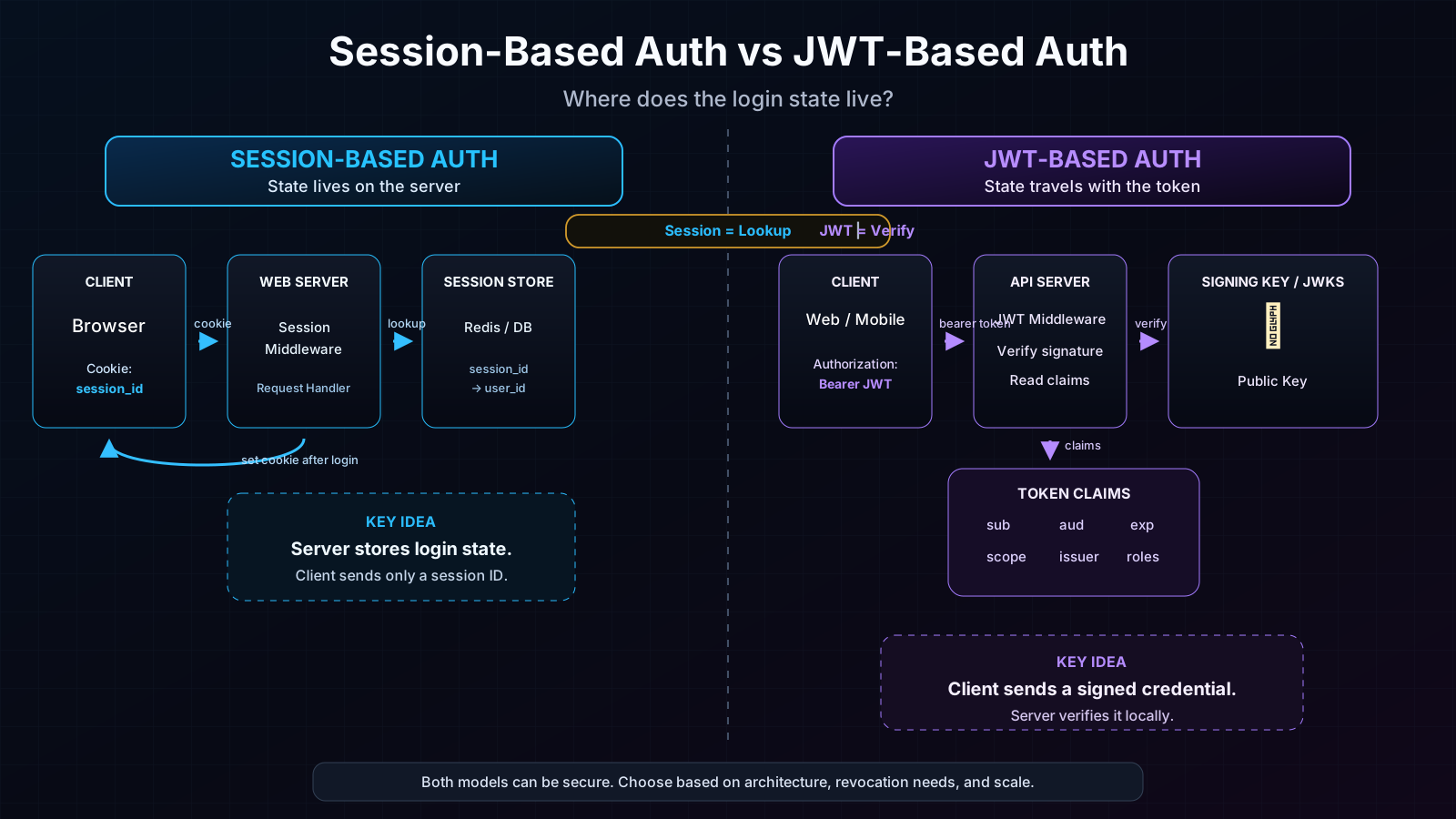
Figure 2. Sessions centralize state on the server. JWTs let clients carry signed claims that APIs can verify locally.
Why do we need access tokens and refresh tokens?
If a system only issues one token, it faces a trade-off.
If the token lives too long, the user experience is good, but the security risk is high if it leaks. If the token expires too quickly, security improves, but users may be forced to log in too often.
That is why modern systems often split tokens into two types:
- Access token: short-lived, used to call APIs.
- Refresh token: longer-lived, used to obtain a new access token.
You can think of it this way:
An access token is a temporary keycard. A refresh token is a renewal credential.
In normal requests, the client uses the access token. When it expires, the client uses the refresh token to get a new access token. This reduces the impact of token leakage while keeping the user experience smooth.
The access token and refresh token pattern is essentially a balance between security and user experience.
OAuth2, OIDC, and SSO: what does third-party login actually solve?
People often say, "I logged in with Google using OAuth2." In casual conversation, that is understandable. Technically, it is not precise.
OAuth2 is not primarily about login. It is about authorization.
OAuth2 asks:
Can this application access certain resources on your behalf?
For example, a calendar app wants to read your Google Calendar. A developer tool wants to access your GitHub repositories. A SaaS product wants to sync your Notion data.
The core question is not who you are. The core question is whether you allow this app to access certain resources.
So OAuth2 is an authorization framework.
Then why do we see buttons like Login with Google?
Because that flow usually also uses OpenID Connect.
OpenID Connect, or OIDC, is an identity layer built on top of OAuth2. It returns an ID token that tells the application who the user is, what their user ID is, what their email is, and whether the identity can be trusted.
A simple way to remember it:
OAuth2 answers: what can this app access?
OIDC answers: who is this user?
SSO, or Single Sign-On, lets a user log in once and access multiple systems. For example, an employee logs in with a company account and then accesses email, CRM, finance tools, code repositories, and analytics dashboards.
The point of SSO is not just to reduce password prompts. It is to centralize identity, permissions, and account lifecycle management.
In enterprise environments, SSO is often paired with SCIM. SSO helps users sign in through a central identity provider. SCIM helps provision and deprovision users across applications. Together, they turn login into part of a broader identity lifecycle.
Web3 wallet login: connecting a wallet is not the same as logging in
In Web3 products, users often start with Connect Wallet.
But connecting a wallet is not the same as completing login.
Connecting a wallet only lets the frontend know a wallet address. The system still needs to verify:
Do you actually control this address?
A more complete Web3 wallet login flow usually looks like this:
- The frontend generates a random message.
- The user signs it with their wallet.
- The backend verifies that the signature comes from the wallet address.
- The system confirms address ownership.
- The backend creates or links a user identity.
- The system issues a session or JWT.
- Future access to tasks, points, referrals, rewards, or admin data still goes through authorization checks.
So Web3 wallet login fits into the same identity model:
- Wallet signature handles authentication: it proves control of an address.
- Session or JWT handles login state: the system remembers the user.
- Authorization handles permissions: the system decides what the user can see or do.
In other words:
Wallet signature is identity proof, not a complete identity system.
What changes when agents start acting?
Modern identity systems are starting to handle more than human users. AI workers, MCP servers, automation tools, backend services, and wallet agents may all need to act inside a product.
Once agents enter the system, login is no longer only about proving a human user. The system also needs to answer:
- Which agent is acting?
- Who owns this agent?
- Is the agent acting for itself, for a user, or for an organization?
- What permissions were delegated?
- When does the delegation expire?
- How can the action be audited or revoked?
This is where simple API keys start to break down. Agentic applications need identity, delegation, policy, and audit trails.
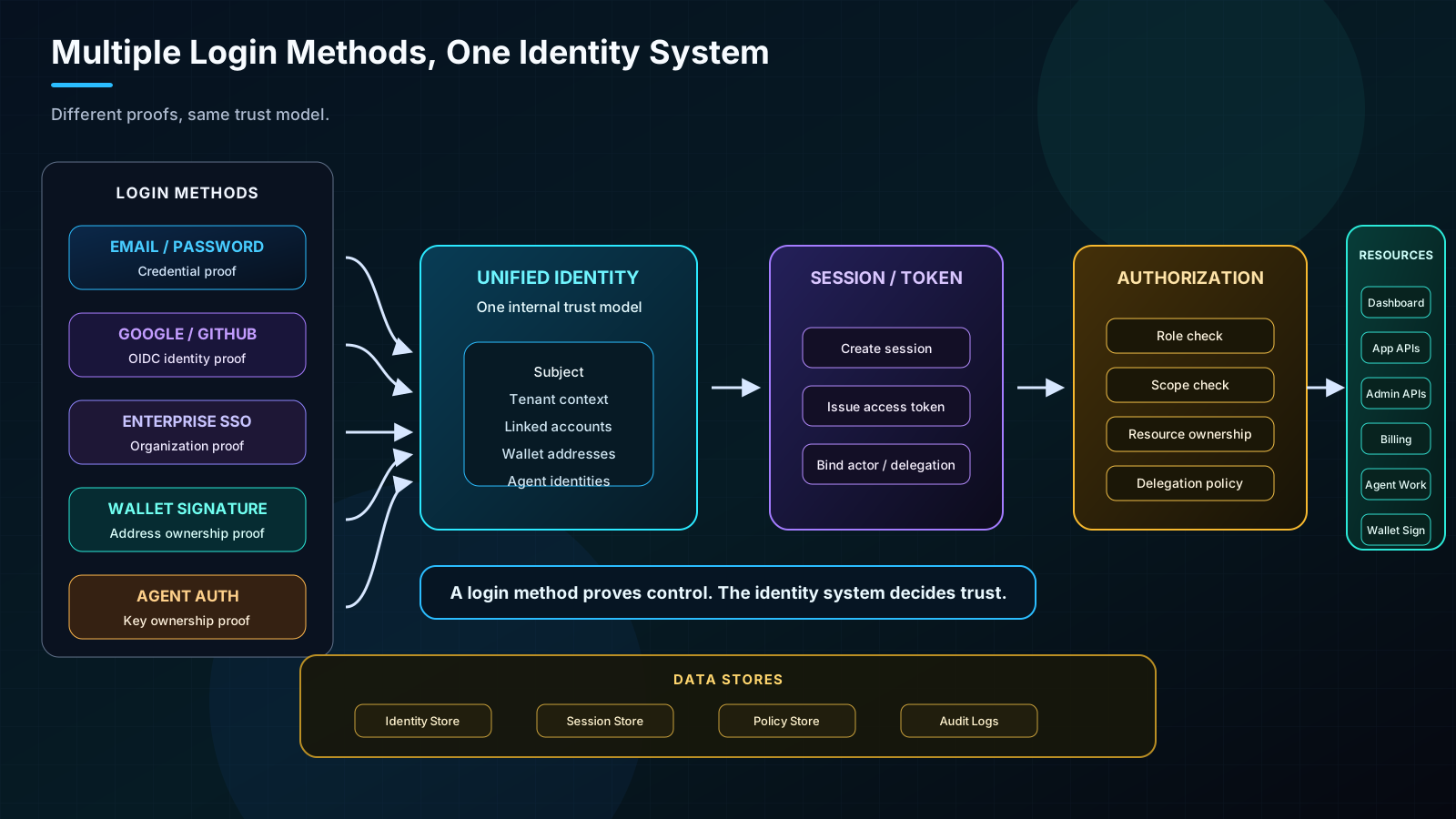
Figure 3. Passwords, OIDC login, SSO, wallet signatures, and agent authentication are different proofs, but they should feed into one identity, token, authorization, and audit model.
Conclusion: login is a chain of trust
Users see a login button. Systems see an identity architecture.
Authentication verifies who you are. Sessions and JWTs help the system remember you. Authorization decides what you can do. OAuth2, OIDC, and SSO allow identity and authorization to move safely across systems. Web3 wallet signatures and agent authentication extend the same trust model into new environments.
So the next time you see a login button, think of it differently:
Login is not just the entry point of a product. It is the beginning of how a system decides whether to trust a user, an app, a wallet, or an agent.